waveshare-single-can-firmware
Waveshare 单 CAN 版 — Tesla FSD CAN Dashboard



⚠️ 免责声明:本项目仅供研究、教育与工程学习目的,严禁在公共道路使用,可能违反当地交通法规与车辆制造商服务条款。使用者自担一切法律与安全风险,作者不承担任何责任。详见 DISCLAIMER.md。
| 中文 | English |
中文
项目简介
本项目是基于 EV Open CAN Tools 的 ESP32 固件,专为 Waveshare ESP32-S3 单 CAN 开发板(如 ESP32-S3-RS485-CAN)适配。通过单路 TWAI CAN 总线连接特斯拉车辆,提供 FSD(Full Self-Driving)相关的 CAN 总线研究与一套驾驶舱风格的 Web 控制面板。
通过板载 WiFi 热点提供 Web 控制面板,无需手机 App,浏览器直接访问。
📱 界面预览
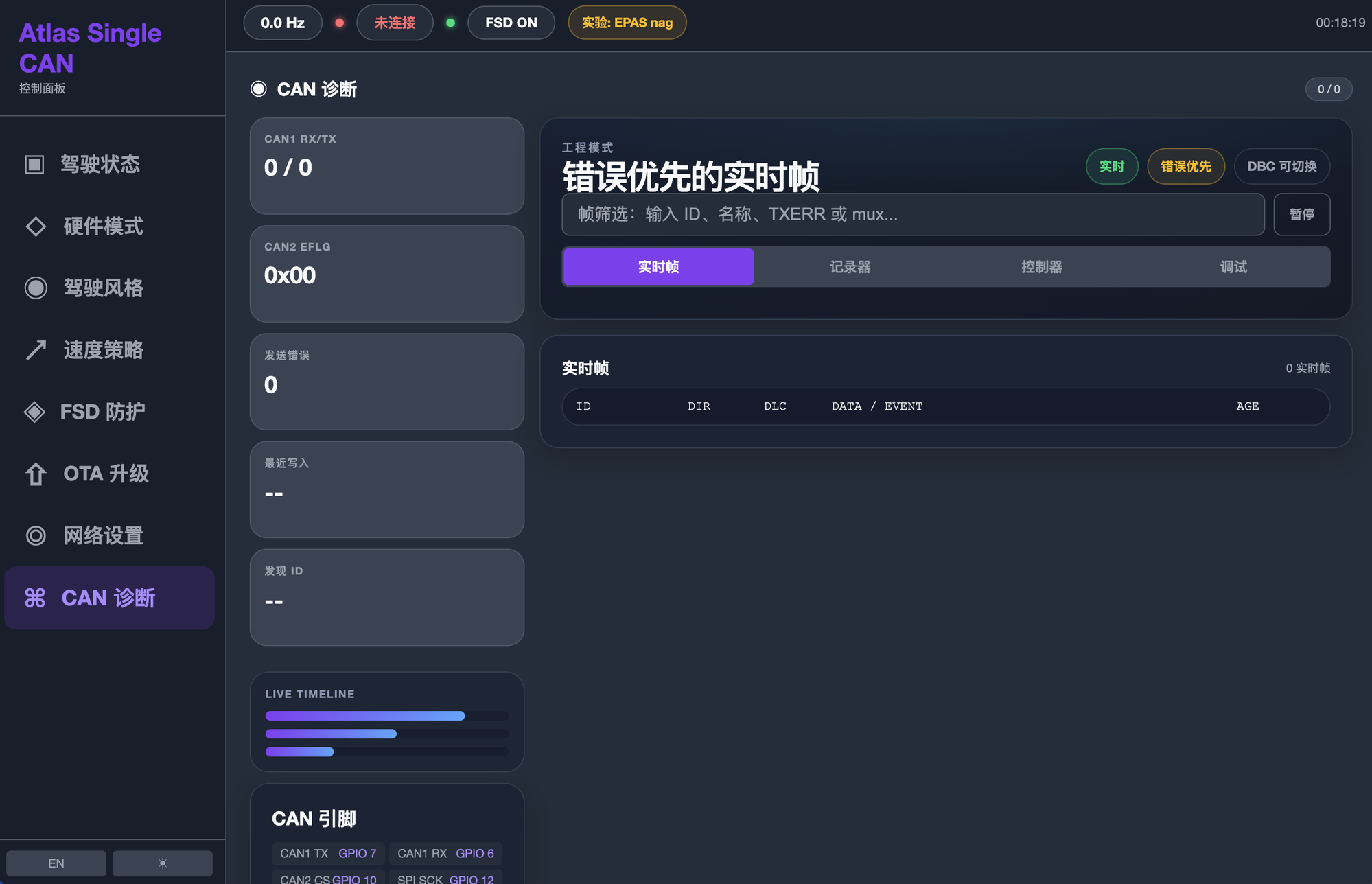
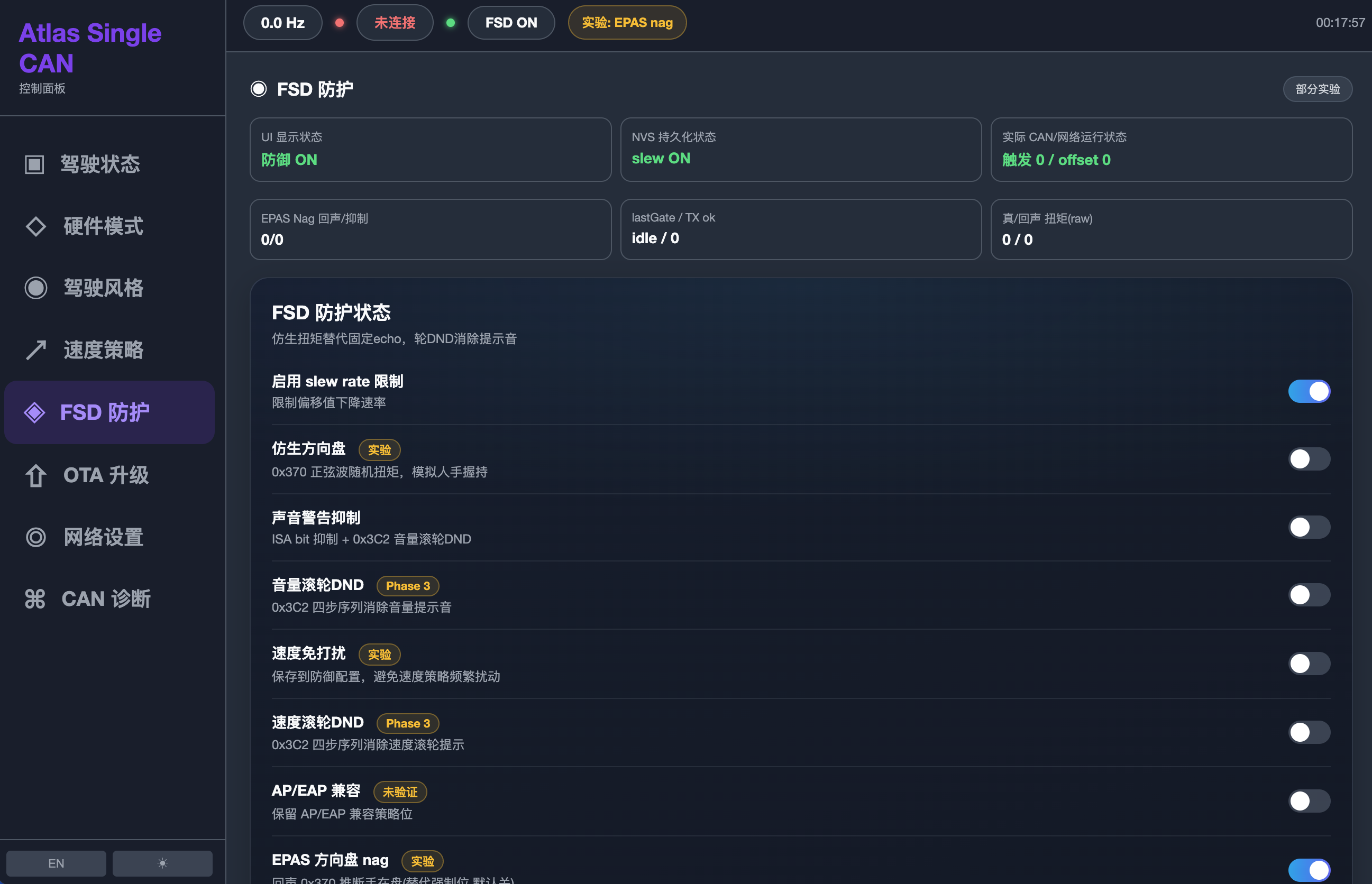
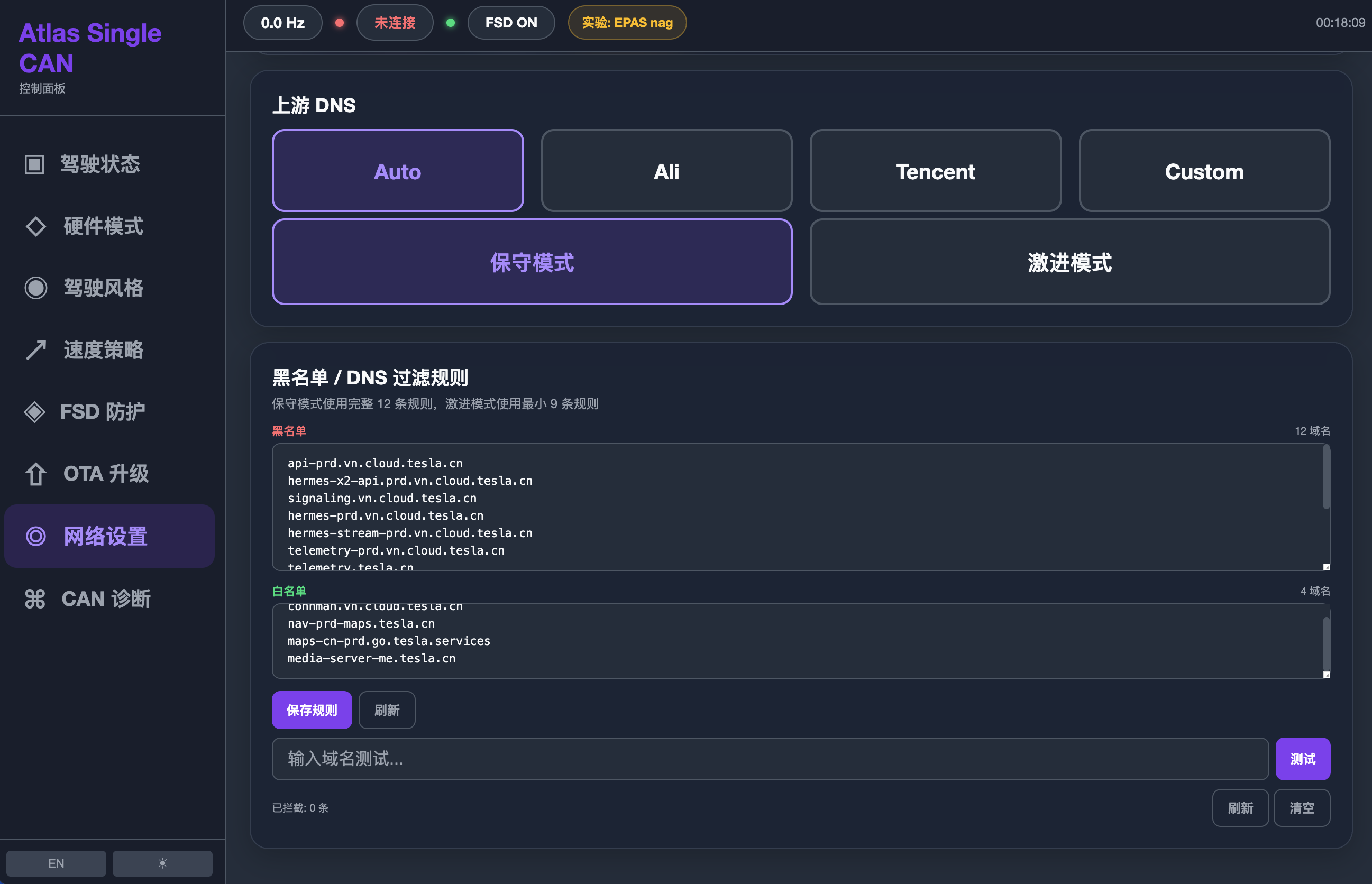
通过板载 WiFi 热点提供驾驶舱风格 Web 控制面板(浏览器访问 http://100.100.1.1/,桌面/手机自适应):
| 驾驶状态中心 | 驾驶风格 | 速度策略 | 硬件模式 |
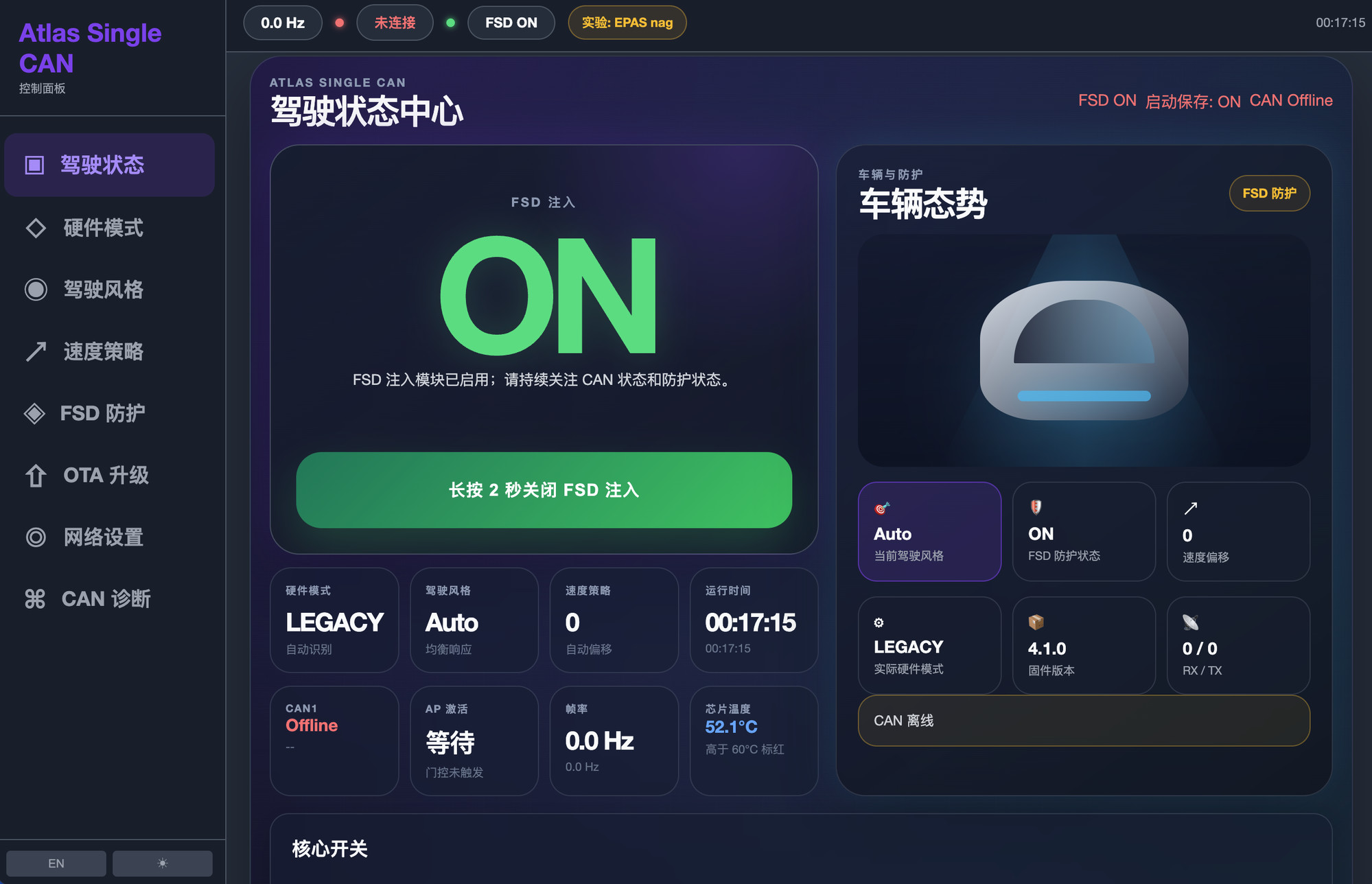 |
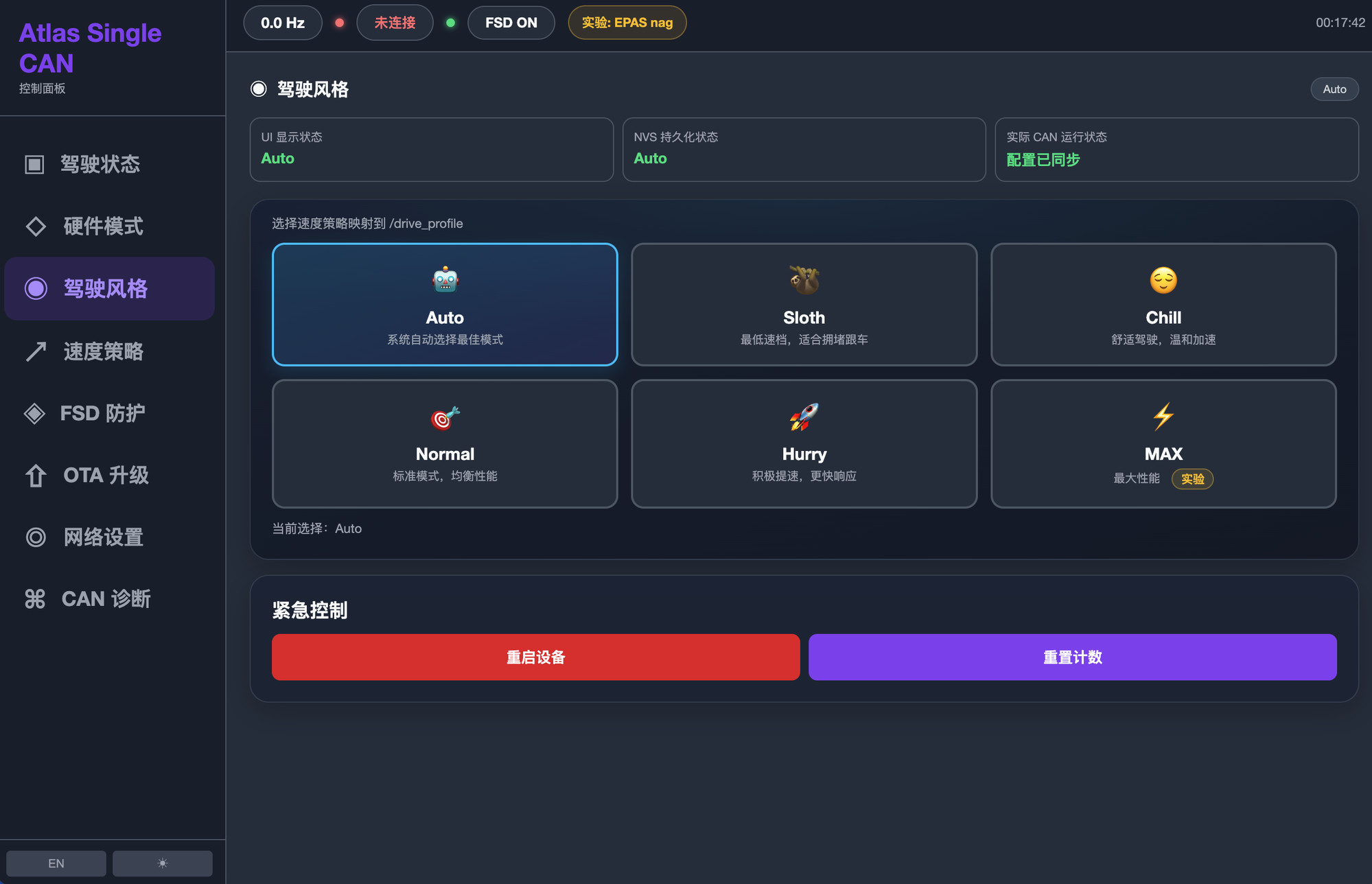 |
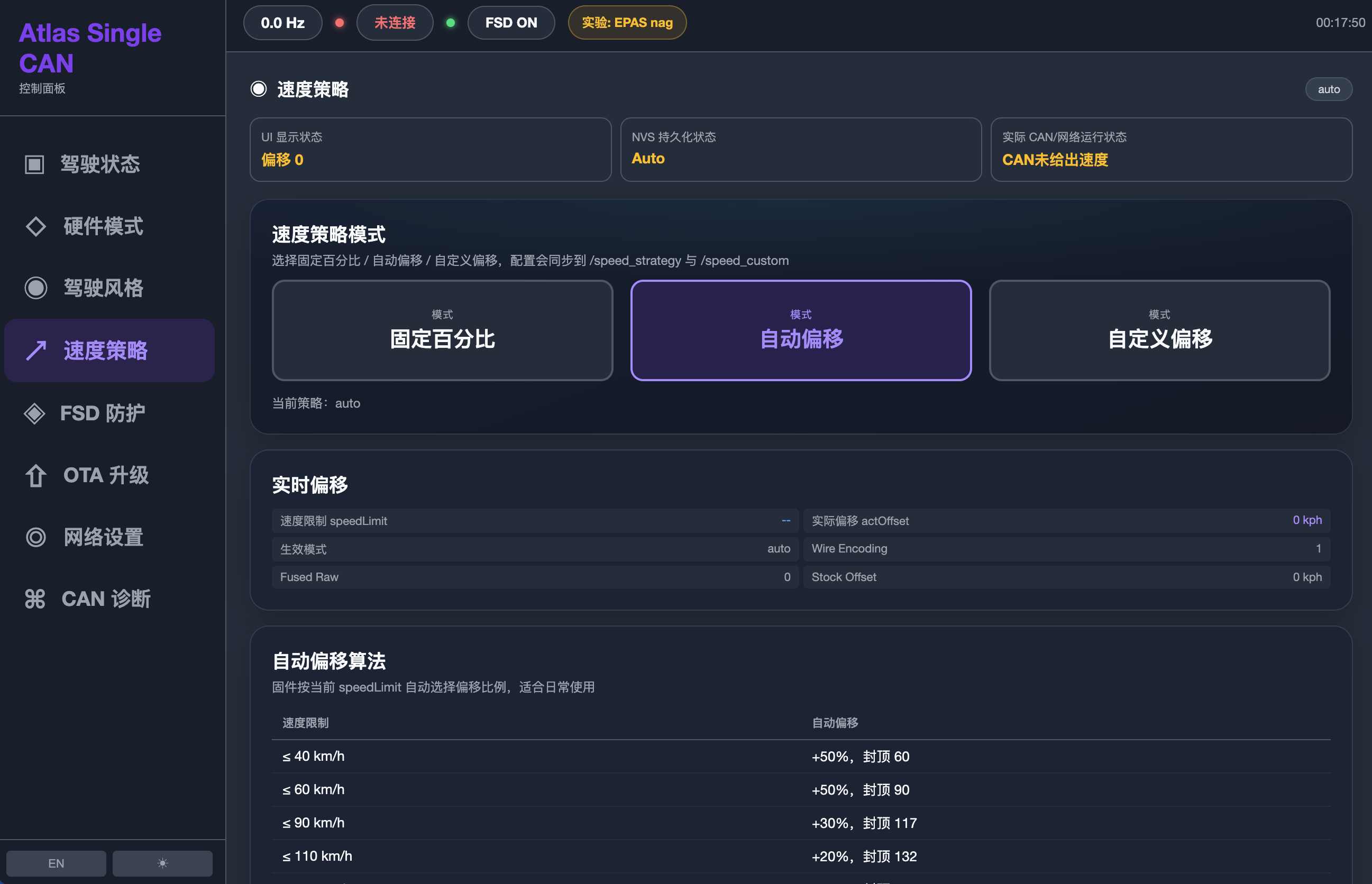 |
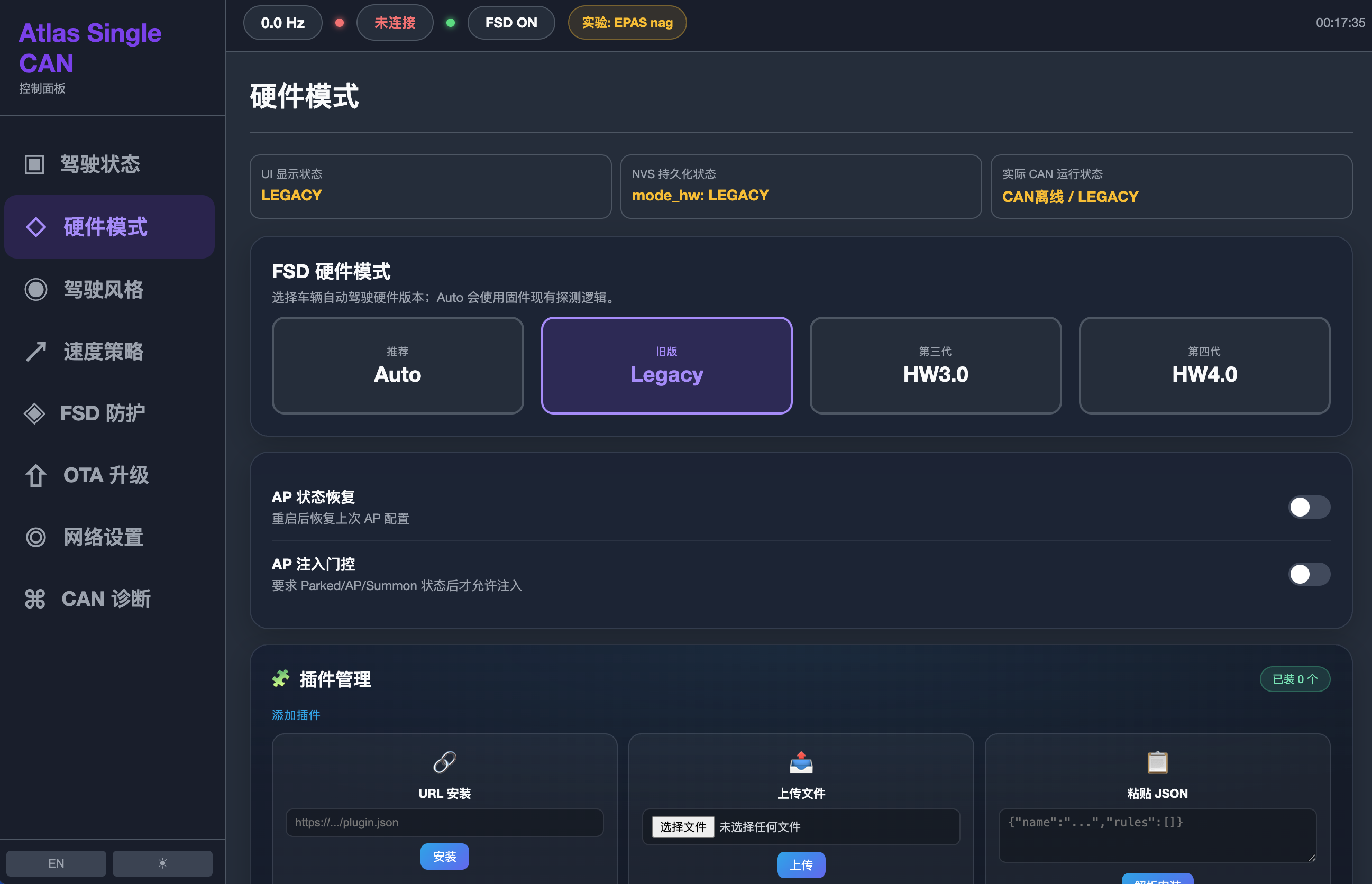 |
| FSD 注入 · 车辆态势 | Auto/Sloth 驾驶模式 | 速度偏移 · 自动算法 | Legacy/HW3/HW4 切换 |
| CAN 诊断 | FSD 防护 | DNS / 过滤 | 手机 · 现场遥控 |
 |
 |
 |
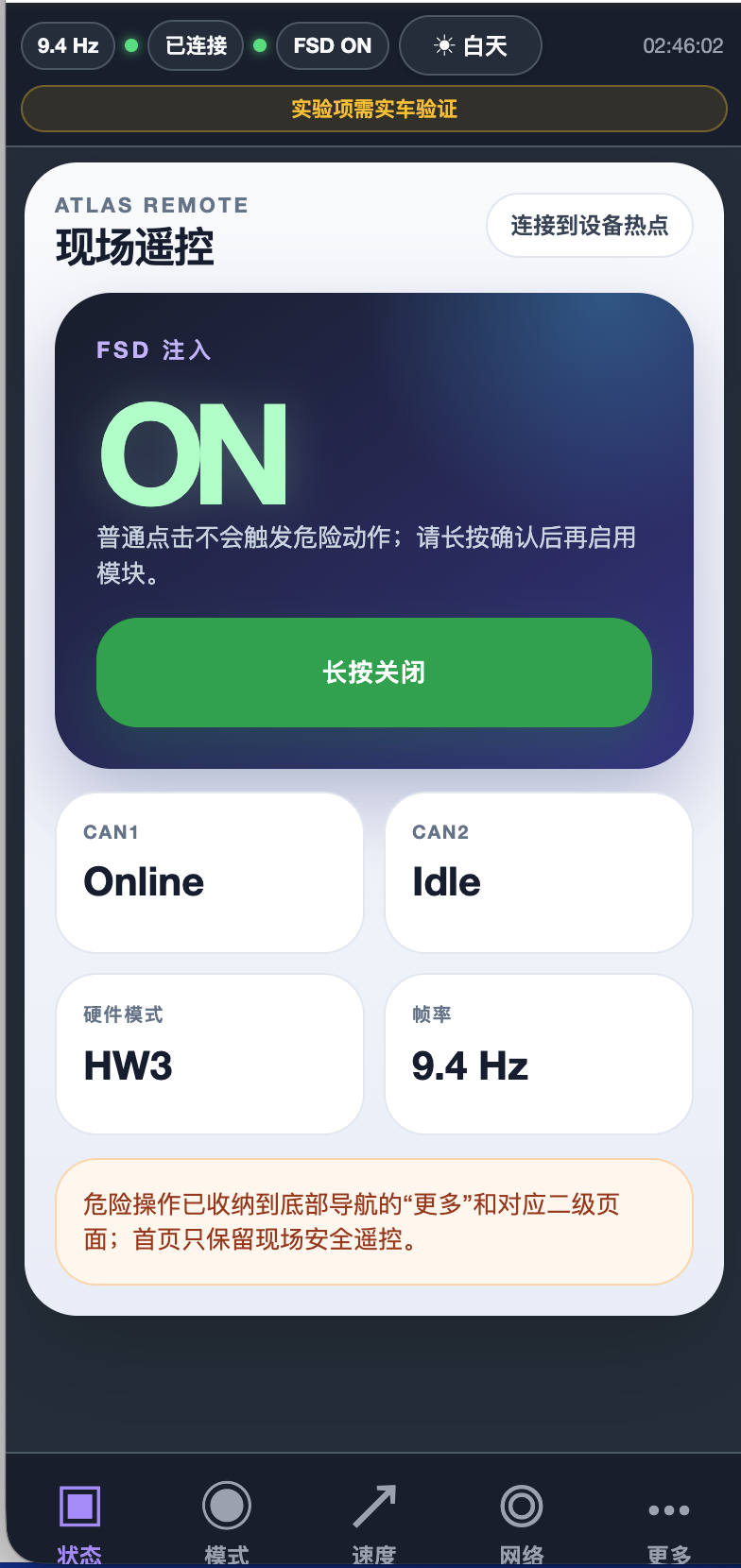 |
| CAN1/CAN2 · 错误帧 · 时间线 | slew rate · 仿生方向盘 | 上游 DNS · 黑白名单 | 竖屏自适应 · 帧率 |
功能列表
- FSD 激活与注入:支持 Legacy / HW3 / HW4 三种车辆协议模式,运行时可切换
- Legacy 速度偏移:在车速报文上叠加可调偏移
- 视觉限速识别关闭:清除视觉识别的限速标志位
- 重写限速:Legacy / HW4 限速报文重写
- 方向盘检测屏蔽(bit-19 baseline,安全路径)
- 限速提示音抑制(ISA chime 抑制)
- AP Injection Gate:安全门控;Legacy AP state
2保持阻断,仅3..6视为 engaged - Instant Engage(实验,默认关闭):真实 AP engaged 边沿可一次性绕过 Legacy AP-First 延迟,但不能绕过 CAN/OTA/checkAD/Abort Guard/Soft Engage 等安全门
- 四模式 Legacy NAG:Off / Human Replay TSL6P / EPAS Late Echo / Reactive Sustained Hold;
bionicSteering仅是历史父开关,不是第五种算法 - 插件引擎:官方 JSON 插件(URL 安装 /
.json上传 / 离线粘贴),默认关闭,优先级管理,状态持久化 - Web Dashboard:驾驶舱 glassmorphism 风格 UI(车机/手机自适应)
- OTA 固件在线升级
- 运行时硬件模式切换(Legacy / HW3 / HW4)
详见 DISCLAIMER.md。所有注入功能保留三重安全门控。
硬件规格
| 参数 | 配置 |
|---|---|
| 开发板 | Waveshare ESP32-S3-RS485-CAN(或兼容 ESP32-S3 单 CAN 板) |
| 主控 | ESP32-S3 |
| Flash | 16 MB |
| CAN | ESP32-S3 TWAI(单路,GPIO 15 TX / GPIO 16 RX) |
| 状态 LED | GPIO 14 |
CAN 接线
将开发板 TWAI 接入特斯拉车辆的 party CAN 总线(通常经由 X179 诊断连接器(位于后中控后方)或 OBD-II 诊断口的 party CAN 引脚;详细 pinout 与各年款车型差异见 hypery11/HARDWARE.md):
| 开发板 | 连接 |
|---|---|
| CAN High(TWAI TX 侧) | 车辆 party CAN High |
| CAN Low(TWAI RX 侧) | 车辆 party CAN Low |
| GND | 车辆地 |
注意: CAN 总线需要 120Ω 终端电阻。请确认车辆端已有终端电阻,否则需外接。接线错误可能损坏开发板或车辆电子系统。
快速开始
1. 环境要求
- PlatformIO(或 PlatformIO for VS Code 插件)
- Python 3.x(UI 构建脚本依赖)
- ESP-IDF(由 PlatformIO 自动管理)
- USB 数据线(连接开发板烧录)
2. 配置密钥文件
cp platformio_profile.example.h platformio_profile.h
编辑 platformio_profile.h,把出厂默认值改成你自己的 WiFi 热点与 OTA 凭证(默认 Atlas-FSD / 12345678,强烈建议修改):
#define DASH_SSID      "Atlas-FSD"        // WiFi 热点名称(出厂默认,建议修改)
#define DASH_PASS      "12345678"          // WiFi 密码(出厂默认,建议修改)
#define DASH_OTA_USER  "admin"             // OTA 用户名
#define DASH_OTA_PASS  "12345678"          // OTA 密码(出厂默认,建议修改)
⚠️
platformio_profile.h已加入.gitignore,不会提交到 Git,请妥善保管。
3. 编译与烧录
# 编译
pio run -e waveshare_single_can_standalone

# 烧录(替换为实际串口,macOS 形如 /dev/cu.usbserial-XXXX)
pio run -e waveshare_single_can_standalone -t upload --upload-port /dev/cu.usbserial-XXXX
或使用 Release 页面的预编译固件 + esptool 逐分区烧录(详见各 Release 说明)。
4. 访问 Dashboard
- 手机或电脑连接开发板 WiFi 热点(你设的
DASH_SSID) - 浏览器打开:
http://100.100.1.1/(或 AP 网关 IP)
运行时配置
在 Web Dashboard 中可切换车辆协议模式(Legacy / HW3 / HW4)。不同年款/硬件版本的车辆使用不同协议,请根据你的实车选择。模式切换在运行时生效并持久化。
Legacy 模式还提供四种明确的 NAG 算法:Off / Human Replay TSL6P / EPAS Late Echo / Reactive Sustained Hold。防护总开关与历史 bionicSteering 字段是父 enable;关闭父开关不会擦除已保存的算法选择。
AP Injection Gate 的默认延迟仍为 2000ms(可配置 0–3000ms)。可选的 Instant Engage 默认关闭;开启后只在 primary Legacy AP 状态出现真实 engaged 边沿时一次性绕过该延迟。state 2 仍被阻断,只有 3..6 视为 engaged;其它 CAN、OTA、checkAD、Abort Guard 与 Soft Engage 门控保持有效。
安全
⚠️ 重要:对车辆 CAN 总线进行任何修改都存在风险。CAN 总线涉及转向、制动、安全气囊等安全关键系统。请仅在充分了解相关报文含义、并在合规、可控(如台架或封闭场地)环境下使用。本项目仅供研究学习,使用者自行承担一切风险与法律责任。详见 DISCLAIMER.md。
⚠️ China 2026.8.3.6 HW3 高风险:该固件收紧了自动驾驶预检。AP 激活边沿注入 FSD-enable(
0x3EE)可能触发方向盘猛甩 + 故障退出。本固件默认开启 AP-First 门控(注入延迟到 AP 稳定 ~2s 后),降低但无法消除该风险(残留 <5%)。建议先用 Listen-Only 模式验证。非 8.3.6 车型如无需此防护,可在仪表盘「AP 门控」开关关闭以直接注入。详见docs/steer-jerk-diagnosis-20260623.md。
💬 交流社区
- Telegram 频道(讨论 / 问答 / 更新通知):https://t.me/+PKsCVABYQTdkZGQ1
- 作者 X(@Jordanjordan88):https://x.com/Jordanjordan88
- 问题反馈:GitHub Issues
贡献
欢迎提交 Issue 与 Pull Request。提交即表示你同意以 GPL-3.0 许可贡献内容。
许可证
本项目基于 GNU General Public License v3.0 授权。详见 LICENSE。
上游项目
基于 EV Open CAN Tools — 一个面向电动车的开源 CAN 总线修改框架。
English

⚠️ Disclaimer: This project is for research, educational, and engineering study purposes only. Do NOT use on public roads. Use may violate local laws and the vehicle manufacturer’s Terms of Service. You assume all risks. See DISCLAIMER.md.
Overview
This project is an ESP32 firmware adaptation of EV Open CAN Tools for Waveshare ESP32-S3 single-CAN boards (e.g., ESP32-S3-RS485-CAN). It connects to a Tesla vehicle via a single TWAI CAN bus and provides FSD-related CAN bus research tools plus a cockpit-style web dashboard.
A web dashboard is served over the onboard WiFi hotspot — no app needed, just a browser.
Features
- FSD activation & injection: supports Legacy / HW3 / HW4 vehicle protocol modes, switchable at runtime
- Legacy speed offset: adjustable offset applied to the speed message
- Vision speed-limit recognition disable: clears vision-detected speed-limit flag bits
- Speed-limit rewrite: Legacy / HW4 speed-limit message rewrite
- Steering-wheel detection shield (bit-19 baseline, safe path)
- ISA chime suppression
- AP Injection Gate: safety gating; Legacy AP state
2stays blocked and only states3..6are engaged - Instant Engage (experimental, off by default): a genuine AP engaged edge can bypass the Legacy AP-First delay once, without bypassing CAN/OTA/checkAD/Abort Guard/Soft Engage gates
- Four Legacy NAG modes: Off / Human Replay TSL6P / EPAS Late Echo / Reactive Sustained Hold;
bionicSteeringis a historical parent enable, not a fifth algorithm - Plugin engine: official JSON plugins (URL install /
.jsonupload / offline paste), disabled by default, priority management, state persistence - Web Dashboard: cockpit glassmorphism UI (car/phone adaptive)
- OTA firmware updates
- Runtime hardware mode switching (Legacy / HW3 / HW4)
See DISCLAIMER.md. All injection features retain triple safety gating.
Hardware Specifications
| Parameter | Value |
|---|---|
| Board | Waveshare ESP32-S3-RS485-CAN (or compatible ESP32-S3 single-CAN board) |
| MCU | ESP32-S3 |
| Flash | 16 MB |
| CAN | ESP32-S3 TWAI (single, GPIO 15 TX / GPIO 16 RX) |
| Status LED | GPIO 14 |
CAN Wiring
Connect the board’s TWAI to the Tesla vehicle’s party CAN bus (typically via the X179 diagnostic connector behind the rear center console, or the party-CAN pins of the OBD-II port; for detailed pinouts and model-year differences see hypery11/HARDWARE.md):
| Board | Connection |
|---|---|
| CAN High (TWAI TX side) | Vehicle party CAN High |
| CAN Low (TWAI RX side) | Vehicle party CAN Low |
| GND | Vehicle ground |
Note: CAN buses require 120Ω termination resistors. Verify the vehicle side already has termination; add external resistors if not. Incorrect wiring may damage the board or vehicle electronics.
Quick Start
1. Prerequisites
- PlatformIO (or PlatformIO for VS Code)
- Python 3.x (UI build scripts)
- ESP-IDF (managed automatically by PlatformIO)
- A USB data cable
2. Configure Secrets
cp platformio_profile.example.h platformio_profile.h
Edit platformio_profile.h to replace the factory defaults with your own WiFi hotspot and OTA credentials (defaults: Atlas-FSD / 12345678 — strongly recommended to change):
#define DASH_SSID      "Atlas-FSD"        // WiFi hotspot SSID (factory default, change recommended)
#define DASH_PASS      "12345678"          // WiFi password (factory default, change recommended)
#define DASH_OTA_USER  "admin"             // OTA username
#define DASH_OTA_PASS  "12345678"          // OTA password (factory default, change recommended)
⚠️
platformio_profile.his listed in.gitignoreand will never be committed. Keep it safe.
3. Build & Flash
# Build
pio run -e waveshare_single_can_standalone

# Flash (replace with your actual port, e.g., /dev/cu.usbserial-XXXX on macOS)
pio run -e waveshare_single_can_standalone -t upload --upload-port /dev/cu.usbserial-XXXX
Or use the prebuilt firmware from the Releases page + esptool per-partition flashing (see each Release’s notes).
4. Access the Dashboard
- Connect your phone or PC to the board’s WiFi hotspot (your
DASH_SSID) - Open a browser:
http://100.100.1.1/(or the AP gateway IP)
Runtime Configuration
Switch the vehicle protocol mode (Legacy / HW3 / HW4) in the web dashboard. Different model years/hardware revisions use different protocols — choose based on your vehicle. Mode changes take effect at runtime and persist.
Legacy mode exposes four explicit NAG algorithms: Off / Human Replay TSL6P / EPAS Late Echo / Reactive Sustained Hold. The defense master and historical bionicSteering field act as parent enables; disabling the parent does not erase the saved algorithm.
The AP Injection Gate keeps the local configurable delay (0–3000 ms, default 2000 ms). Optional Instant Engage is off by default and bypasses that delay only once on a genuine primary Legacy AP engaged edge. State 2 remains blocked, only states 3..6 are engaged, and all CAN, OTA, checkAD, Abort Guard, and Soft Engage gates remain in force.
Safety
⚠️ Important: Modifying CAN bus traffic carries real risk. The CAN bus touches safety-critical systems including steering, braking, and airbags. Only use this firmware if you fully understand the frames involved, and only in compliant, controlled environments (e.g., a bench or closed course). This project is for research and study only. You are solely responsible for any consequences. See DISCLAIMER.md.
💬 Community
- Telegram channel (discussion / Q&A / update notices): https://t.me/+PKsCVABYQTdkZGQ1
- Author on X (@Jordanjordan88): https://x.com/Jordanjordan88
- Bug reports: GitHub Issues
Contributing
Issues and Pull Requests are welcome. By submitting, you agree your contributions are licensed under GPL-3.0.
License
Licensed under the GNU General Public License v3.0. See LICENSE.
Upstream Project
Based on EV Open CAN Tools — an open-source CAN bus modification framework for electric vehicles.